
Intoduction
When an Employee is added to the system, they will need to have their Standard Pay setup, included in this Standard Pay will be a Pay Item for Employer SGC Superannuation.
When this Pay Item is present, you would notice in the Detail area below the Pay Lines, that the Superannuation Provide details can be added.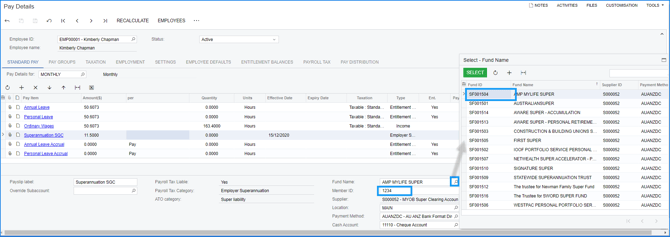
- By highlighting the Super Pay Item,then
- Select the Magnifier in the Fund Name field in the subsection below
- You can now select available Superannuation Funds,,you will likely only need to add the Member ID after it has been added
- If the Required Fund is not listed, you will need to navigate to the Superannuation Funds Screen and Add the Appropriate Fund
What if the new Employee does not nominate a Super Fund?
If a new employee does not nominate a super fund, you must request their stapled super fund details from the ATO. If they don't have one or use your default fund, you must contact the employer's default fund to officially enrol them and get a valid Member ID.
Using "001" or "NEW" as a temporary or default Member ID for a new employee is a common workaround when processing payroll, but it can lead to payment rejections or duplication errors in clearing houses.
How to use Flare's automated super fund lookup in your WFM onboarding process
Click here for how to use Flare's automated super fund lookup in your WFM onboarding process.